Listing card
The flagship browse-page card — hide any field without code, or restyle any part with CSS hooks.
The listing card is the flagship surface of the public site: the tile a buyer scans when browsing. It ships with a clean, professional default, and — because you own the page — every part of it is customizable two ways: hide fields without any code, or restyle any part with a few lines of CSS.
The card is produced by the Properties block (barbican/property-list) and its
relatives, and the same card appears in the list and table views and on the agent,
office, and open-house pages — so a change you make here carries everywhere a listing
is shown.
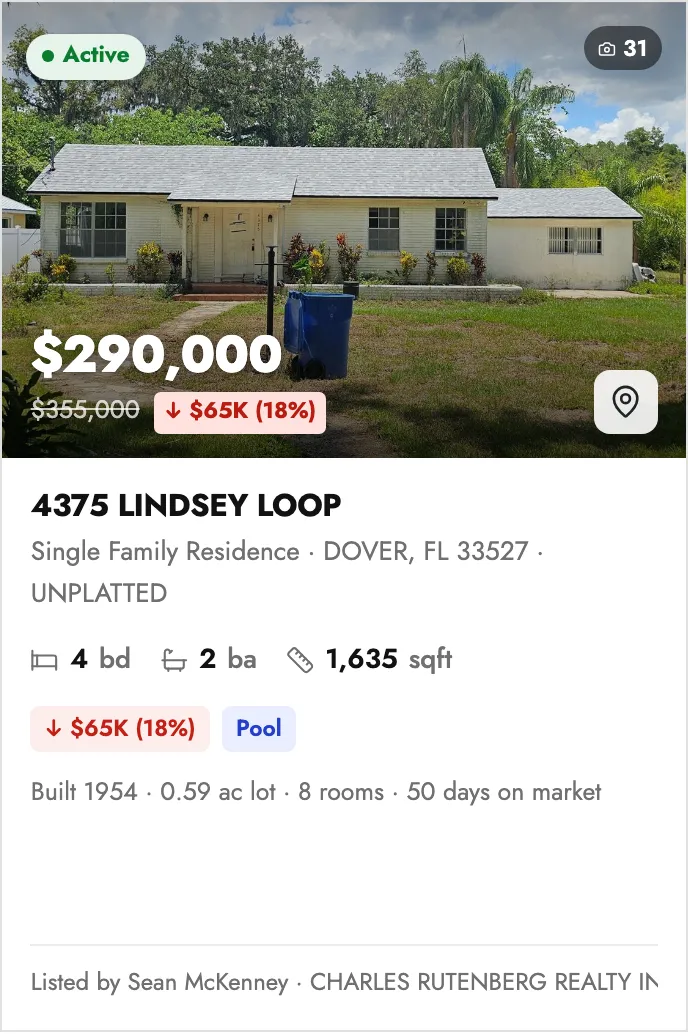
Hiding fields (no code)
Section titled “Hiding fields (no code)”Select the Properties block, open the inspector, and find the Card fields panel. Every data point is a toggle, and everything is on by default. Turn one off and it disappears from every card on the page:
| Toggle | What it controls |
|---|---|
| Status pill | The “Active / Pending / …” pill on the photo |
| Bedrooms | The bed count in the specs row |
| Bathrooms | The bath count in the specs row |
| Living area | The square-footage (or acreage) in the specs row |
| Price drop | The struck-through original price + cut tag |
| Photo count | The photo-count badge on the photo |
| Tour badge | The “Video / 3D tour” badge on the photo |
| Map pin | The map affordance on the photo |
| Highlight chips | The signal chips (new listing, open house, solar, pool…) |
| Details line | The secondary line (built year, lot, garage, HOA, days on market…) |
| Listing agent / MLS | The attribution footer |
The price and the address are always shown — they’re the card’s identity.
Restyling with CSS
Section titled “Restyling with CSS”Every part of the card carries a BEM class under the barbican-listing-card root.
For example — recolour the details line and enlarge the on-photo price:
/* Make the details line brand-blue instead of grey */.barbican-listing-card__meta { color: #1e40af; }
/* Bigger price on the photo */.barbican-listing-card__price--onphoto { font-size: 1.9em; }
The full hook list
Section titled “The full hook list”| Class | Targets |
|---|---|
barbican-listing-card |
The whole card (the clickable <a>) |
barbican-listing-card__media |
The photo area (the 3 : 2 hero box) |
barbican-listing-card__media--empty |
The “no photos on feed” placeholder box |
barbican-listing-card__photo |
The <img> itself |
barbican-listing-card__scrim |
The gradient over the photo (keeps overlays legible) |
barbican-listing-card__placeholder-label |
The “no photos on feed” caption |
barbican-listing-card__status |
The status-pill slot (top-left of the photo) |
barbican-listing-card__status-pill |
The status pill itself |
barbican-listing-card__status-dot |
The coloured dot inside the pill |
barbican-listing-card__badges |
The badge slot (top-right of the photo) |
barbican-listing-card__badge |
A single overlay badge (base) |
barbican-listing-card__badge--photos |
The photo-count badge |
barbican-listing-card__badge--tour |
The tour badge |
barbican-listing-card__hero-footer |
The bottom row on the photo (price + map pin) |
barbican-listing-card__price |
The price (base) |
barbican-listing-card__price--onphoto |
The price when it sits on the photo |
barbican-listing-card__price--plain |
The price when there’s no photo (moves into the body) |
barbican-listing-card__pricedrop |
The original-price + cut-tag group |
barbican-listing-card__origprice |
The struck-through original price |
barbican-listing-card__droptag |
The cut tag (“↓ $25k (5%)”) |
barbican-listing-card__mappin |
The map affordance on the photo |
barbican-listing-card__body |
The text area below the photo |
barbican-listing-card__title |
The address / headline |
barbican-listing-card__location |
The location line under the title |
barbican-listing-card__specs |
The beds / baths / area row |
barbican-listing-card__spec |
One spec item (base) |
barbican-listing-card__spec--beds |
The bedroom item |
barbican-listing-card__spec--baths |
The bathroom item |
barbican-listing-card__spec--area |
The living-area item |
barbican-listing-card__spec-unit |
The unit label (“bd”, “ba”, “sqft”) inside a spec |
barbican-listing-card__chips |
The highlight-chips row |
barbican-listing-card__chip |
A single highlight chip |
barbican-listing-card__meta |
The details line (built, lot, garage/stories, HOA, days on market…) |
barbican-listing-card__footer |
The attribution footer |
barbican-listing-card__agent |
The “Listed by …” text |
barbican-listing-card__mls |
The “MLS# …” fallback text |
Recolour the whole card at once
Section titled “Recolour the whole card at once”The card’s chrome is derived from the shared --barbican-* custom properties (see
the overview), so you rarely need
individual hooks to rebrand it. Set the tokens once and the card — and the rest of
the public page — recolours together.